Statistics (experimental)
Tier: Free teaser, Basic for the party at a glance, the highlights and the character table, PRO for everything else. Status: experimental.
This feature is experimental. Figures may change or miss rolls. Please report problems, see Feedback.
| What | Tier |
|---|---|
| Session so far: rolls, natural 20s and 1s, most active roller | Free |
| Party at a glance, highlights, character table, range filter (latest session, 30 days, all time) | Basic |
| Players see their own statistics | PRO |
| Monster table, Checks & saves, Combat and Luck tabs | PRO |
| d20 distribution and session charts | PRO |
| Luck awards, and luck per skill, ability and save | PRO |
| Session history and CSV / JSON export | PRO |
| Import past rolls from D&D Beyond, and from a file | PRO |
| Session recap to chat and Discord, by hand or when a session ends, with the luck awards if you want them | PRO |
Dice statistics for your campaign, built from the rolls Gamelog relays from D&D Beyond. Open them in Gamelog Config → Statistics.
Where the numbers come from
- Every roll the GM’s browser sees is stored there, so flushing the chat log does not erase the statistics.
- Records are filed per D&D Beyond campaign. The page shows the current campaign.
- They are kept in the GM’s browser only, because they include private rolls. A second GM, or a cleared browser, starts with its own (or no) history.
- Rolls from before the module was installed, or made while no GM browser was open and deleted since, are missing. Import and export on the Settings tab can fill that gap, see Import and export.
- A new session starts after a 3-hour pause. The GM can also start one by hand, from the Sessions tab. The recap can be posted when a session ends, see Session recap.
Rolls made in Foundry itself (from character or NPC sheets) are counted only if you switch them on, see Settings.
The tabs
The Time period selector at the top picks the range: latest session, last 30 days, or all time. Checks & saves and Luck also have a Character selector (the whole party or one character), and so has the session history on the Sessions tab.
Charts have a y axis, and hovering a bar or a data point shows its exact value. Longer explanations sit behind a small info icon: hover or tab to it. Wide tables scroll sideways and cut long headings short; hover a heading for its full text.
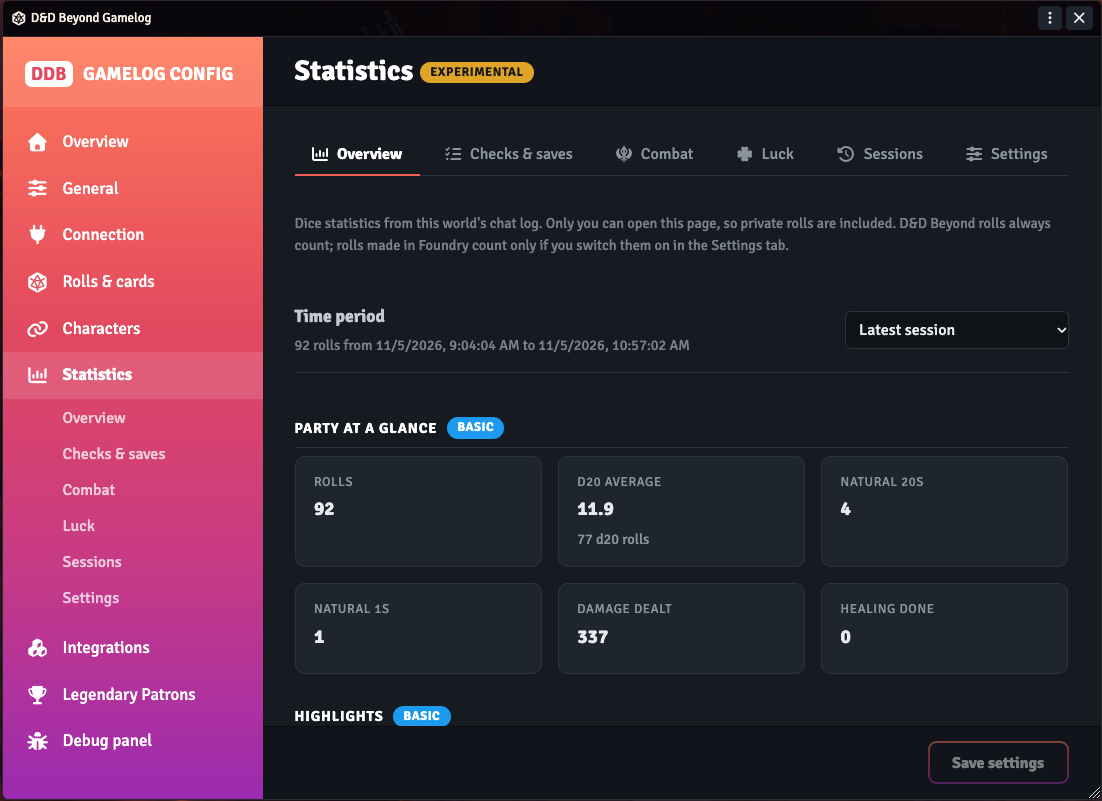
- Overview: the party at a glance (total rolls, d20 average, natural 20s and 1s, damage dealt, healing done), highlights (highest and lowest d20 average, most natural 20s and 1s, biggest hit, most damage, most healing) and a table per character. With PRO, also a table for monsters and others.
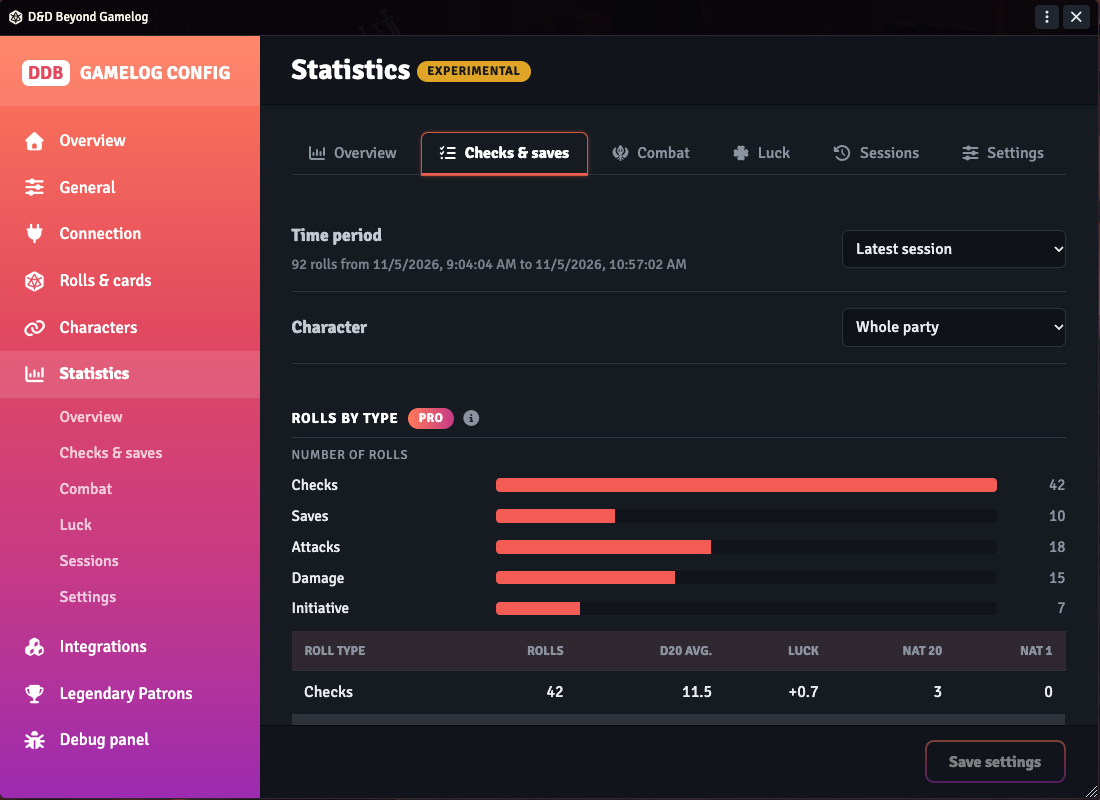
- Checks & saves (PRO): rolls by type, skills, ability checks and saving throws by ability, for the whole party or one character. Each table has a Luck column and a luck chart, see Luck.
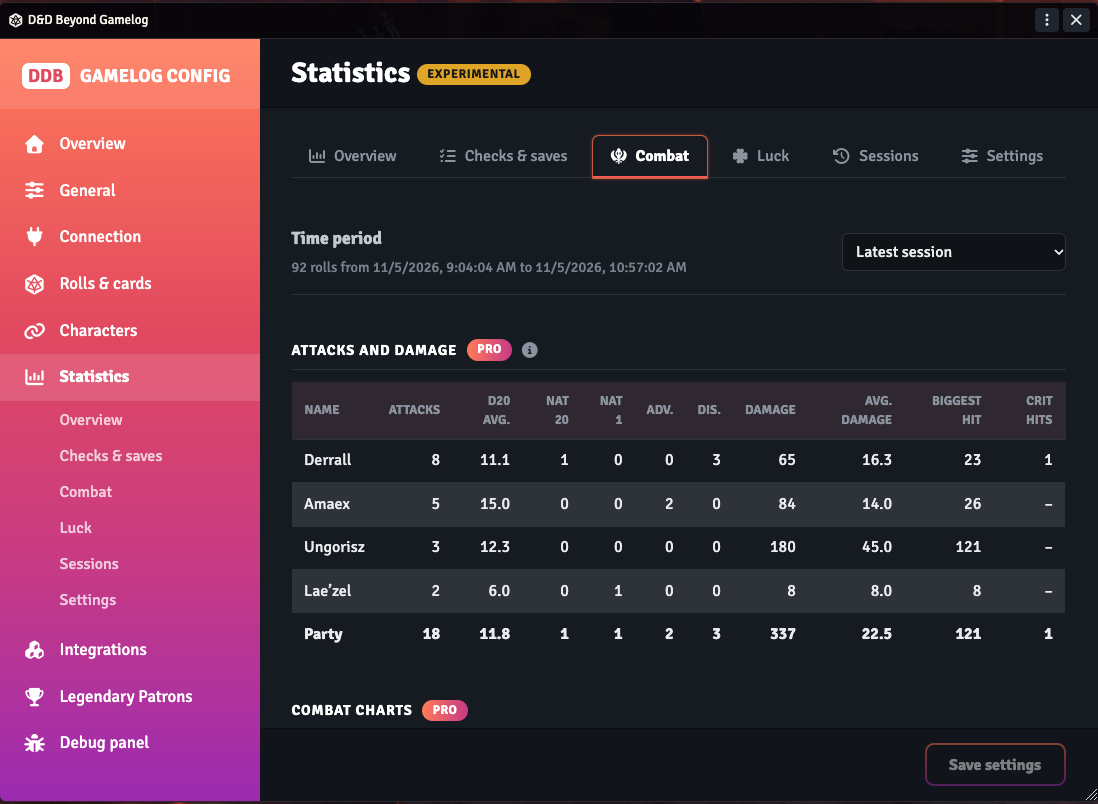
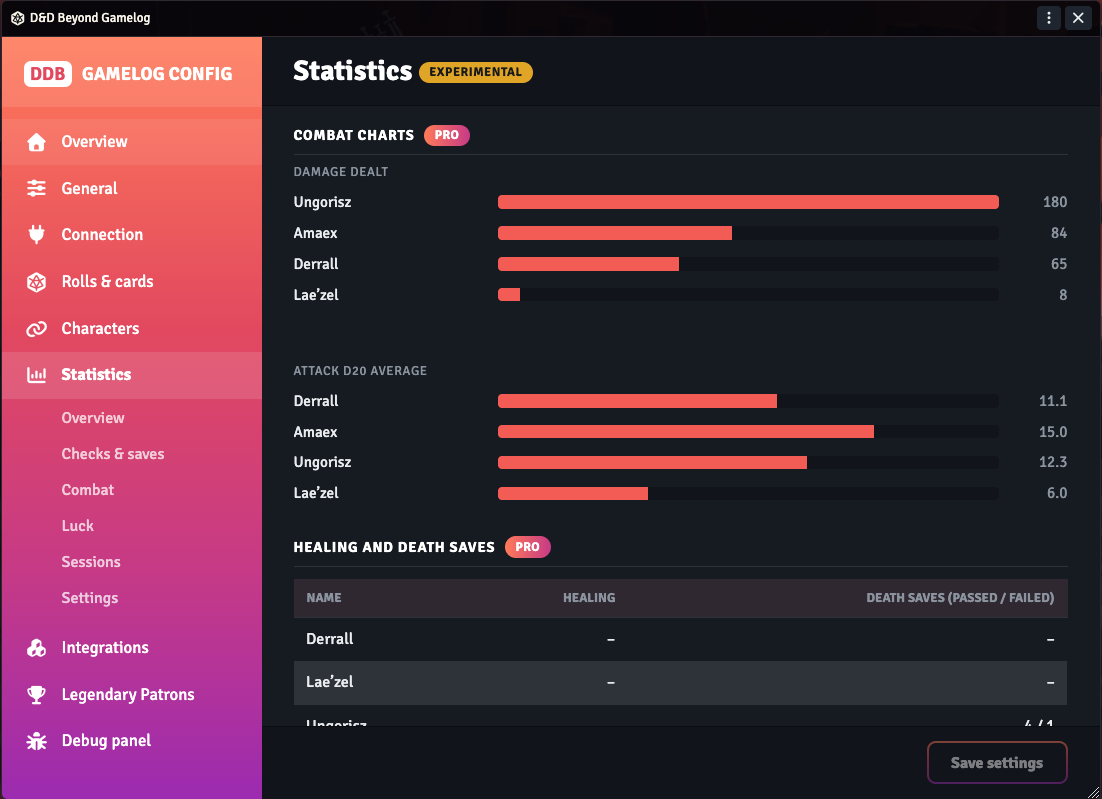
- Combat (PRO): attacks, damage, healing and death saves, per character and for the party. Counts are shown by default; switch on Show percentages in Settings to add shares of the attack rolls.
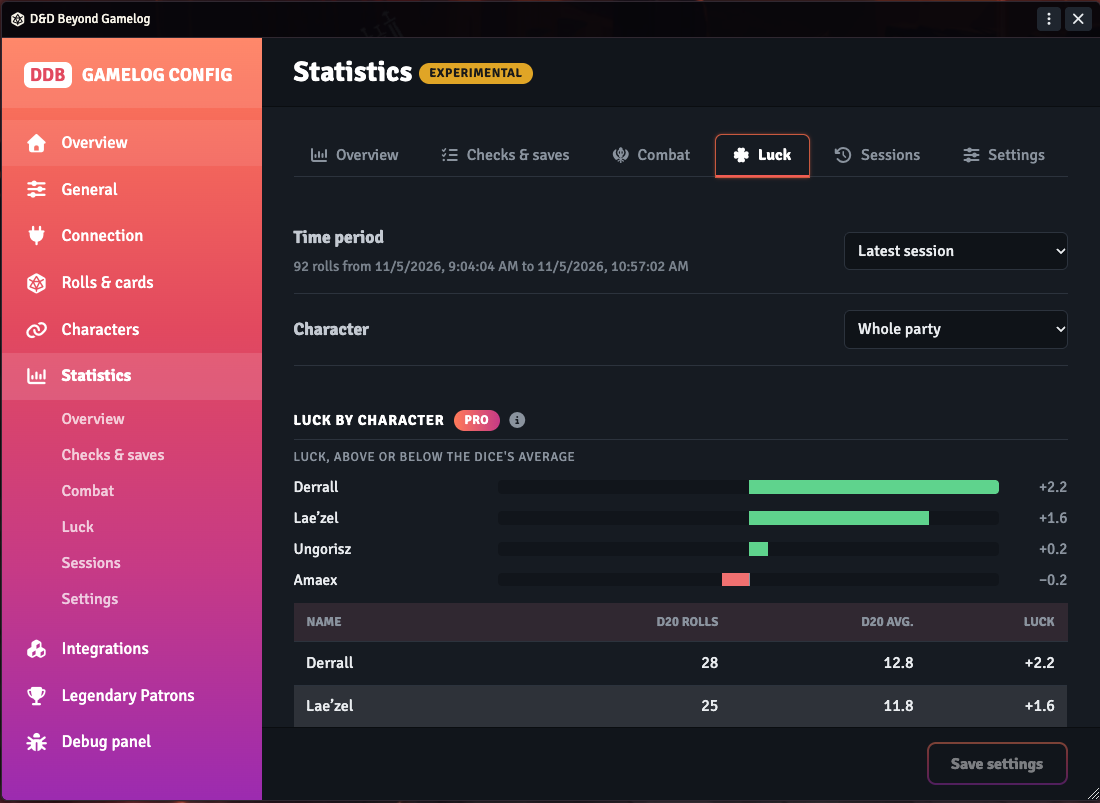
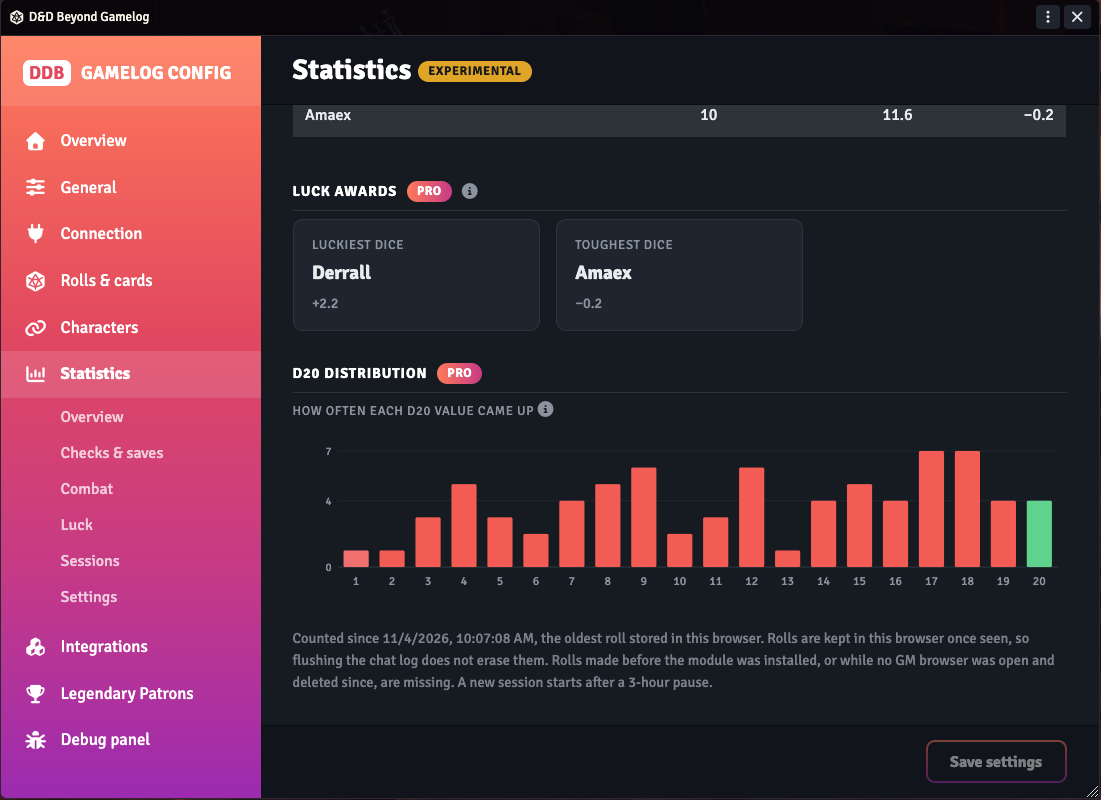
- Luck (PRO): how far each character’s d20 average is above or below what the dice give on average, the luck awards and the d20 distribution chart, for the whole party or the character you pick.
- Sessions (PRO): session history with charts, starting a new session, and the recap.
- Settings: what is counted and shown, the automatic recap, Import and export, and Reset statistics.
There is no hit rate. D&D Beyond rolls do not say what they were aimed at or whether they hit. The Combat tab shows the dice instead: attack d20 average, natural 20 and 1 shares, advantage and disadvantage use, damage and crits.
Rolls stored by earlier builds have no roll type. They count in the totals and tables of the Overview, but not in Checks & saves, Combat or Luck, and the tabs tell you how many were left out.
Example data on locked tabs
With Show upgrade hints on (Gamelog Config → General), the tabs your membership does not include show made-up example rolls instead of a lock: Checks & saves, Combat and Luck (with the awards and the d20 chart) for Lite and Basic, and the session history and charts on the Sessions tab. A banner says the figures are examples, they are never stored, and your own rolls are not touched. Lite members get the tab bar too, with the real session-so-far teaser on the Overview tab. Switch the hints off and the tabs show the lock again.
Luck
Luck is the d20 average minus the average the dice give for each roll’s advantage mode. It evens out over many rolls. Per character it shows from 10 d20 rolls; until a character has that many, the Luck tab says so.
Luck per skill (PRO): on Checks & saves, every table (roll types, skills, ability checks, saving throws) has a Luck column, and each section a signed chart, using the same measure. It shows from 10 d20 rolls of a skill, and follows the Character selector, so you can see where one character’s dice run hot or cold.
Luck awards (PRO) name the luckiest and toughest dice, and the longest hot streak (3 or more d20 rolls of 16 or higher in a row) and cold streak (3 or more of 5 or lower). They are off by default and only the GM sees them on the Luck tab. They reach the table only if you switch on Name luck awards in the recap, see Session recap. Ties get no award.
Player view (PRO)
With Let players see their own statistics on (the default; locked without PRO), players get a My dice statistics button next to the chat input. It shows the rolls of the characters they own, with the range filter and these tabs:
- Overview: personal bests, luck and a table per character.
- Checks & saves, Combat and Luck (with the d20 distribution): the same figures as the GM page, for their own characters. Luck awards stay with the GM.
- Sessions: rolls, d20 average and luck per session, once there are two.
Monsters and other players’ private rolls never show.
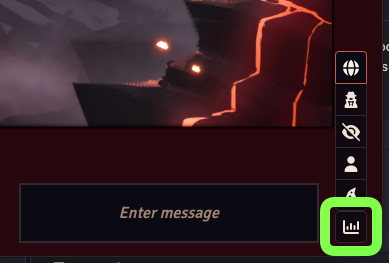
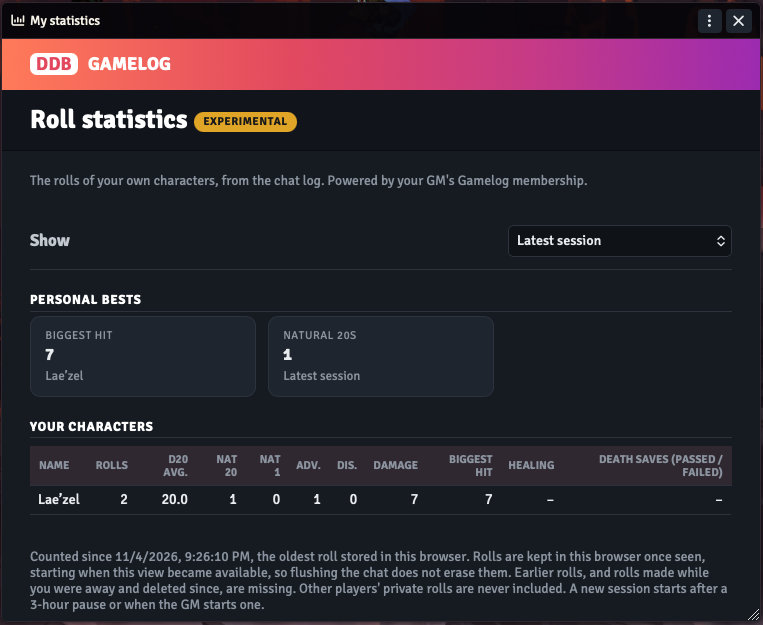
It runs on the GM’s PRO membership, players do not need one. Without PRO the button is not shown.
Where a player’s numbers come from:
- The player’s browser keeps the rolls it sees in the chat.
- When the view opens while the GM who relays the rolls is online, the GM’s browser adds the public rolls of the player’s characters it has, imported ones included. If that GM is offline, the view shows what the player’s browser has, and the next open fills the rest.
- The player’s own private rolls show only if their browser saw them. They are not sent over, because Foundry’s socket reaches every browser at the table.
- With Leave out short sessions on, the player view leaves out the same sessions as the GM page.
- After the GM uses Reset statistics, the player’s browser clears its own records once and fills up again from the GM.
- Rolls of characters without a Foundry actor are not shown.
Session recap (PRO)
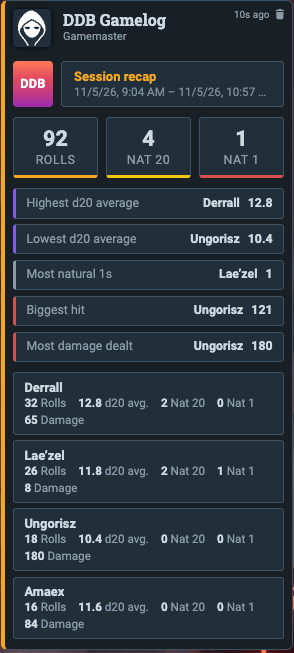
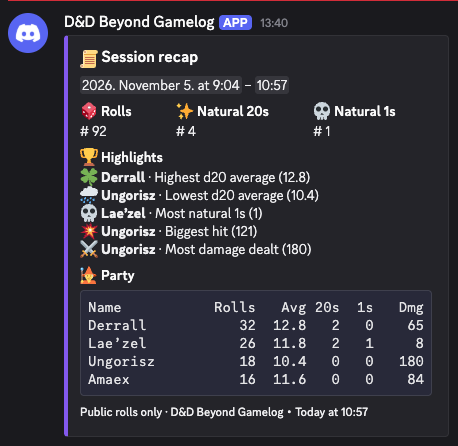
The latest session as a summary: totals, highlights and the characters.
- Post recap to chat puts a themed card in the chat for the whole table, sent as “DDB Gamelog”. Each character gets its own row with labelled values (rolls, d20 average, natural 20s and 1s, damage, healing) that wrap to fit a narrow chat, and empty values are left out.
- Post recap to Discord needs the Discord integration, see Discord. The embed shows the totals as large numbers, the highlights with an emoji each, and the party as an aligned table. It is in English.
- The Settings tab can post the recap by itself when a session ends: after a 3-hour pause without rolls, or when you use Start under Current session. After a pause only the GM browser that relays the rolls posts (so a table with several GMs gets one post), only for a session that ended in the last 24 hours, and only with at least 5 public rolls. Each session is posted once.
- Name luck awards in the recap (PRO, off by default) adds the session’s luckiest and toughest dice and hot and cold streaks to the chat card and the Discord embed. The whole table sees them, so they are opt-in.
Only public rolls are included, so private rolls never appear.
Session history and current session (PRO)
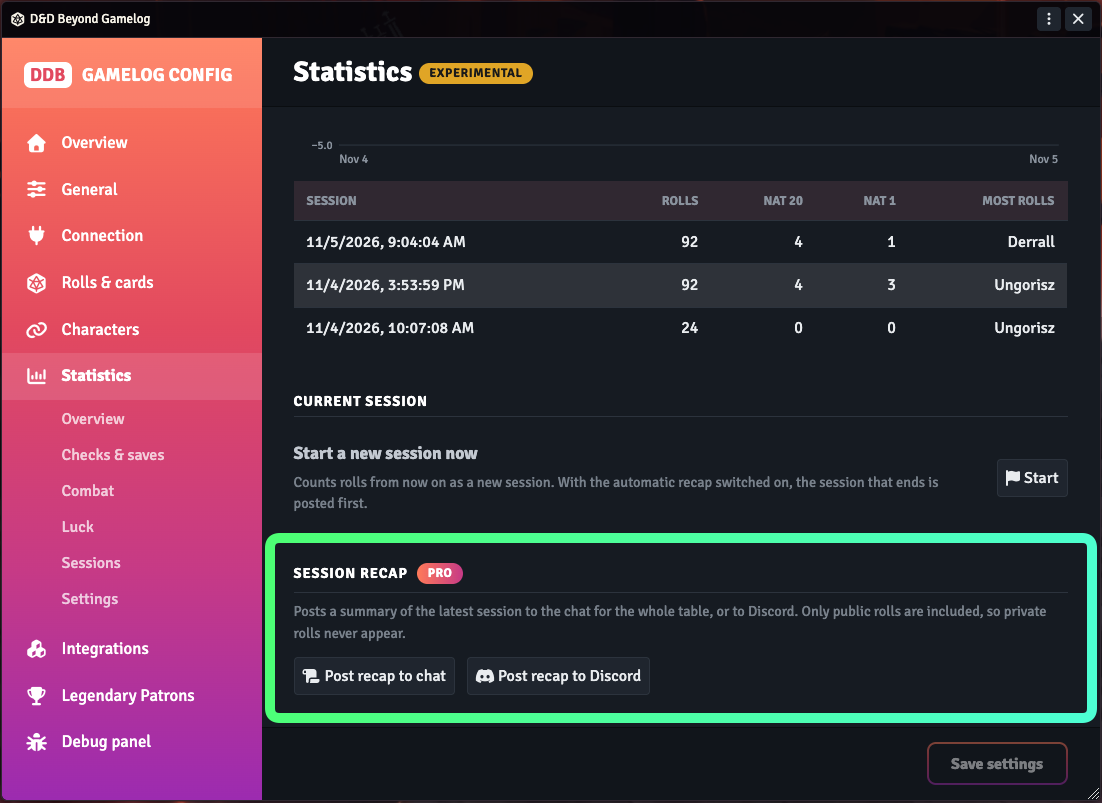
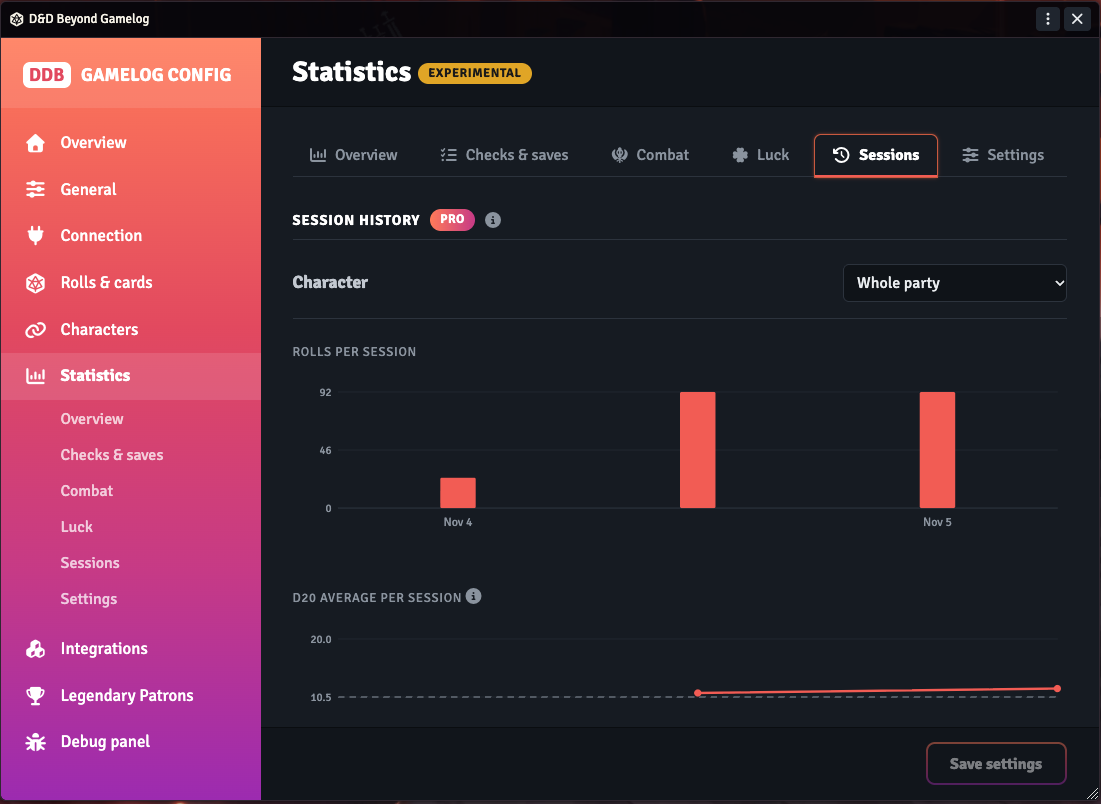
The Sessions tab lists the latest sessions of the campaign with their rolls, natural 20s and 1s and the most active character, and charts the rolls, the d20 average and the luck per session once there are two. The Character selector narrows the charts to one character.
The charts show about ten session dates along the bottom. Sessions are spaced evenly, not by date, so a break in play does not show as a gap. A session without a value is a grey hollow mark on the dashed line, joined to its neighbours by a faint dashed line: on the d20 average chart it had no d20 roll, on the luck chart fewer than 10. Hover the mark to see which.
Under Current session, Start counts rolls from now on as a new session. With the automatic recap switched on, the session that ends is posted first.
Import and export (PRO)
One section on the Settings tab, with three rows. Records are kept in this browser only, so this is also how you move statistics to another GM browser.
Export saves a file: CSV has one row per character or monster and session. JSON has the same figures and also keeps every roll of the campaign, private ones included, so it can be imported again. It is your own browser’s data.
From D&D Beyond reads the campaign’s earlier rolls from D&D Beyond’s game log and adds the ones this browser has not stored yet, so the statistics reach back before tracking began.
- Only the browser that relays D&D Beyond rolls can do it, and it needs a connection to the server and a picked campaign. Otherwise the button is disabled and says why.
- It walks back from the newest roll, one page of 20 to 40 rolls at a time, and shows how many rolls it read, how many were new and how far back it got. Stop ends it; what was already added stays.
- Rolls the browser already has are not counted twice, and private rolls meant for other players are never included.
- If D&D Beyond limits requests, it waits 5, 15 and 45 seconds and tries again before it gives up. A run that stopped, failed or was limited carries on where it left off next time: the button then reads Continue import from D&D Beyond.
- An import can run once an hour per campaign and reads at most the newest 1,000 rolls. When it stops at 1,000, the page says so; older rolls are not read. Within the hour the import button is disabled; hover it to see when it works again. A first page that fails does not use up the hour.
- After a complete import, running it again stops at the first page of rolls it already knows.
- Also recreate the roll cards adds each imported roll to the chat log as a card dated when it was rolled. Rolls that already have a card are skipped. The cards are silent, do not run automation, and are not counted twice in the statistics. Private rolls are only shown to the GM and the owner. Cards are made for the newest 50, 100 or 200 rolls of an import, as you pick next to the tick box (200 is the most); the statistics take every roll. Damage and healing cards show the weapon or spell like live cards, without the buttons to apply damage. The page shows how many cards were made.
From a file imports a JSON export made with Export JSON, also one from another GM browser, and adds its rolls. Repeating it adds nothing. Exports made before the JSON kept the rolls cannot be imported, the page tells you so, and a file that is not a statistics export is refused without changing anything.
Settings
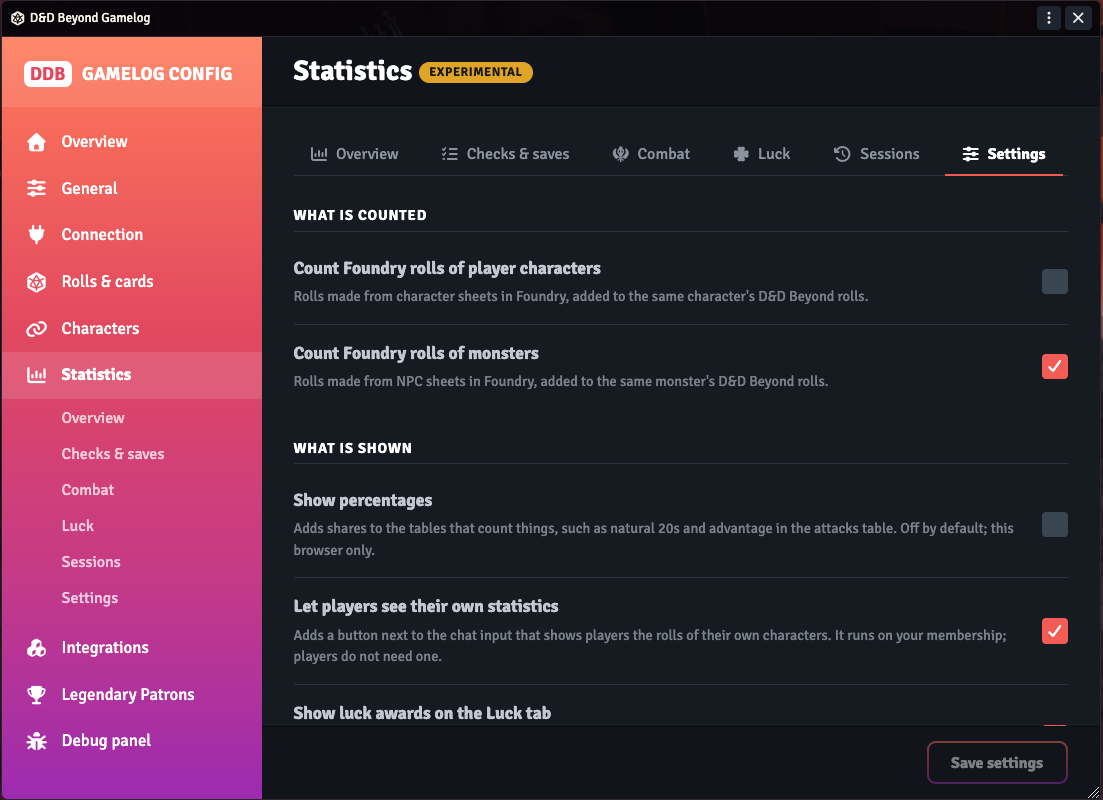
- Count Foundry rolls of player characters / of monsters: also count rolls made from sheets in Foundry, added to the same actor’s D&D Beyond rolls. Off by default, experimental.
- Leave out short sessions: sessions with fewer than 10 d20 rolls by player characters, such as a test or a few rolls between games, are left out of every tab, the session history, the charts and the export, and of the player view. Nothing is deleted; switch it off to count them again. Off by default.
- Show percentages: shares next to the counts in the Combat table (natural 20s and 1s, advantage and disadvantage). Off by default, and kept per browser.
- Let players see their own statistics: the player view above.
- Show luck awards: on the Luck tab, off by default.
- Automatic recap to chat and to Discord when a session ends, and Name luck awards in the recap.
- Import and export: see above.
- Reset statistics: a red button that deletes the roll records this browser stored for the current campaign, after a confirmation. Rolls still in the chat log are not counted again.
Known limits
- Statistics are only as complete as what the GM’s browser saw, see Where the numbers come from.
- The history is not shared between GM browsers: use Import and export to move it.
- The hourly import limit is kept on the server and starts again if the server restarts.
- Only the latest manual session start is remembered, so older hand-made splits are not recovered.
- The automatic recap after a pause only runs while the relaying GM browser is open: it posts when it next sees a session that ended within the last day.
- Without a membership that includes them, locked parts show a hint instead, see Tiers.