Combat tracker (experimental)
Tier: PRO. Status: experimental.
This feature is experimental. It works, but it may change or break in any release. Please report problems, see Feedback.
| What | Tier |
|---|---|
| D&D Beyond combat tracker in Foundry (experimental) | PRO |
The GM can load a D&D Beyond encounter into Foundry’s combat tracker. Initiative, turns, rounds and monster hit points then follow the DM’s combat tracker on D&D Beyond.
Turn it on
It is on by default for PRO. The switch is D&D Beyond combat tracker in Gamelog Config → Integrations → Modules. Nothing happens until you load an encounter, so you can leave it on.
Load an encounter
You choose the encounter yourself. Gamelog does not pick one up automatically.
- Only encounters attached to the campaign you connected are offered.
- Encounters without a name are shown as “Untitled Encounter”.
- The list of encounters is remembered by the module. Refresh it when you add or change an encounter on D&D Beyond.
- Once loaded, the synced combat becomes the active combat in Foundry.
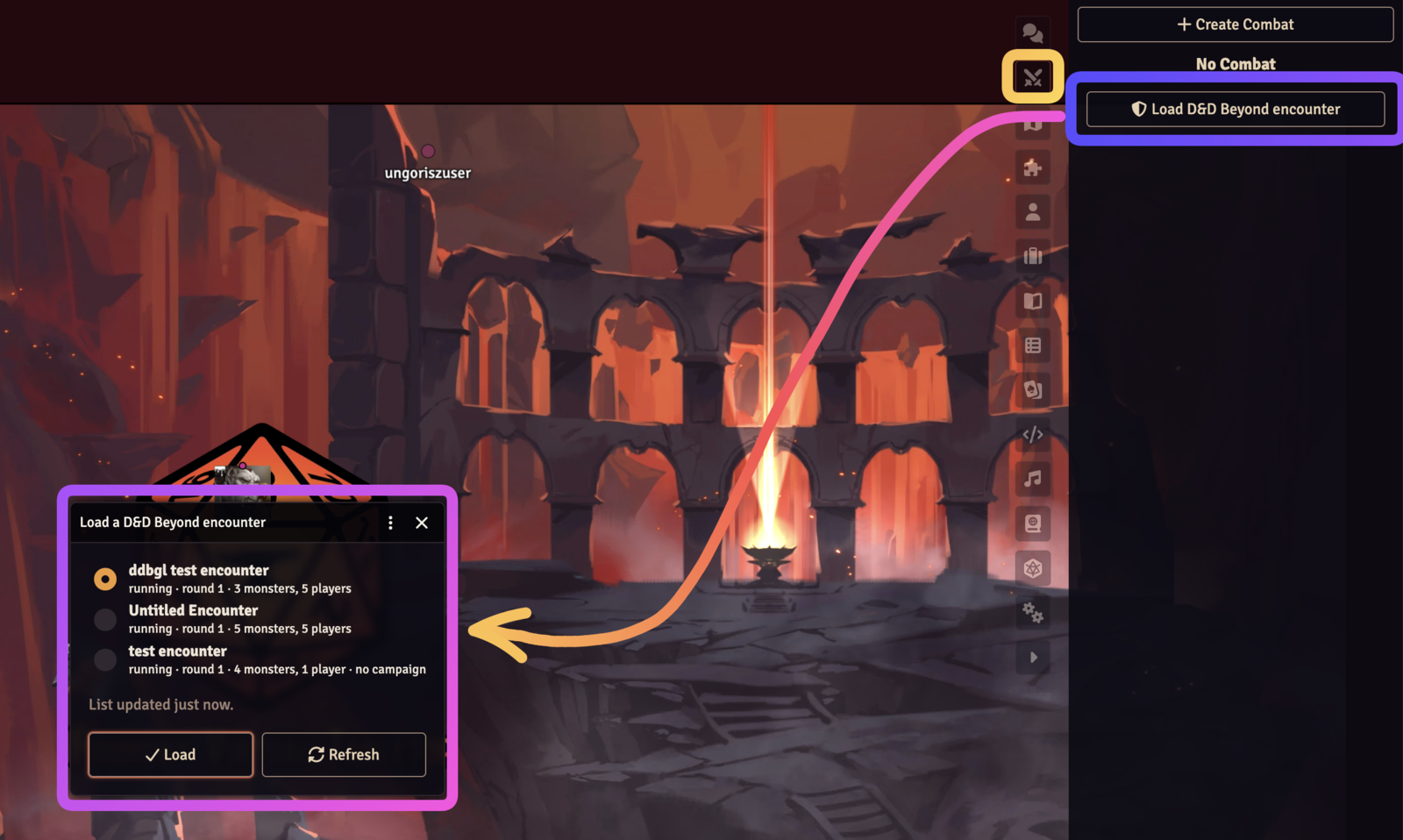
Open Foundry’s combat tracker. Above the list there is a Load D&D Beyond encounter button for the GM. It opens the list of your encounters; pick one and click Load. The dialog also has a Refresh button and says how old the list is.
The bar then shows D&D Beyond: ‹name› with a Stop button. Stop ends the mirroring and leaves the Foundry combat as it is, as a normal Foundry combat. Deleting the combat stops the mirroring too.
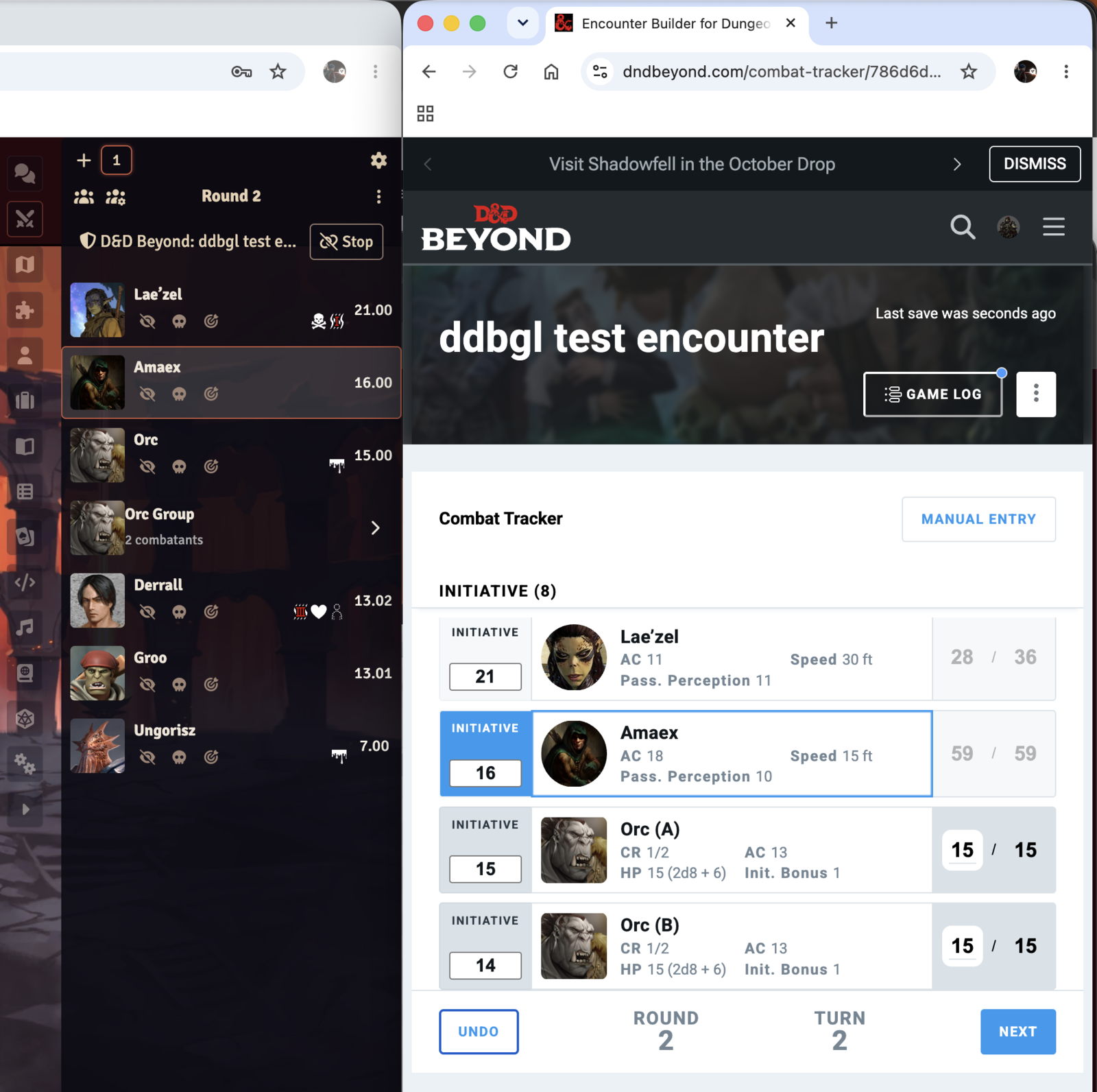
The button only works in the GM browser that relays, and only while it is connected.
Order of turns
Ties in initiative are ordered like D&D Beyond orders them, by name, so the same combatant is on turn in both places.
Pausing and ending
If the combat is paused on D&D Beyond, Foundry keeps it instead of ending it. It continues when the DM presses Resume on D&D Beyond. D&D Beyond combats are never really “ended”, they are only paused or left, which is why you load and stop them yourself.
If you load an encounter whose combat is still in Foundry’s tracker, for example after Stop, the setting Loading an encounter again decides what happens. You find it in Gamelog Config → Integrations → Combat tracker:
| Option | What it does |
|---|---|
| Ask every time | Asks whether to continue the existing combat or start over (default) |
| Continue the existing combat | Keeps the combat and picks up where it was |
| Start over | Deletes that combat and builds a new one from D&D Beyond |
Other combats on the scene are only deleted after you confirm it.
Why it is not instant
Expect a few seconds between pressing Next on D&D Beyond and seeing the turn change in Foundry. That is normal, and it is not your connection.
Two waits add up:
- D&D Beyond saves on a timer. Their combat tracker does not store every click right away; it waits a few seconds and then writes the encounter. Until that happens, the change does not exist anywhere outside the DM’s own browser.
- Gamelog reads the saved encounter. Only once D&D Beyond has saved can we see the change and send it to Foundry.
So a turn usually appears in Foundry around 3 to 8 seconds after you press the button, sometimes a little more.
When nothing changes for about a minute, Gamelog checks D&D Beyond less often, up to every 15 seconds, to save requests. The first change after such a quiet spell can therefore take a little longer to show up; after that it is fast again.
There is no setting for this and nothing to tune. D&D Beyond offers no live feed for the combat tracker, so reading the saved encounter is the only way, and their save timer sets the floor. If you ever see a delay far longer than that, tell us, because that is a different problem.
When D&D Beyond limits requests
Gamelog reads D&D Beyond through a shared connection that only allows a certain number of requests per day. A long combat uses a lot of them. If the limit is reached, D&D Beyond answers with a “Limit Exceeded” error, Gamelog tells the GM that the combat sync is paused, and it tries again by itself after a few minutes. Nothing is lost: Foundry keeps the combat as it is and catches up on the next successful check.
If it happens often, please tell us when and how long your combat had been running, see Feedback.
Known limits
- One direction only: D&D Beyond changes Foundry. What you change in Foundry is overwritten on the next update and never sent back to D&D Beyond.
- Only combatants whose token is on the scene you are viewing are added. Players need a linked character; monsters are matched through ddb-importer and only when their token is already placed. Gamelog tells you who was left out.
- Monster hit points follow D&D Beyond; conditions on monsters do not, because D&D Beyond does not store them in the encounter. Conditions on player characters come from Character sync.
- Changes arrive a few seconds after D&D Beyond saves them, not instantly, see Why it is not instant.
- When D&D Beyond limits requests, the sync pauses for a few minutes and resumes by itself, see When D&D Beyond limits requests.
- While an encounter is loaded, initiative rolls from the game log are not written to the tracker; the encounter is the only source of initiative.
- If you delete the encounter on D&D Beyond, mirroring stops and Gamelog tells you.