Rolls and chat cards
Tier: Free, with some parts in Basic and PRO (listed below).
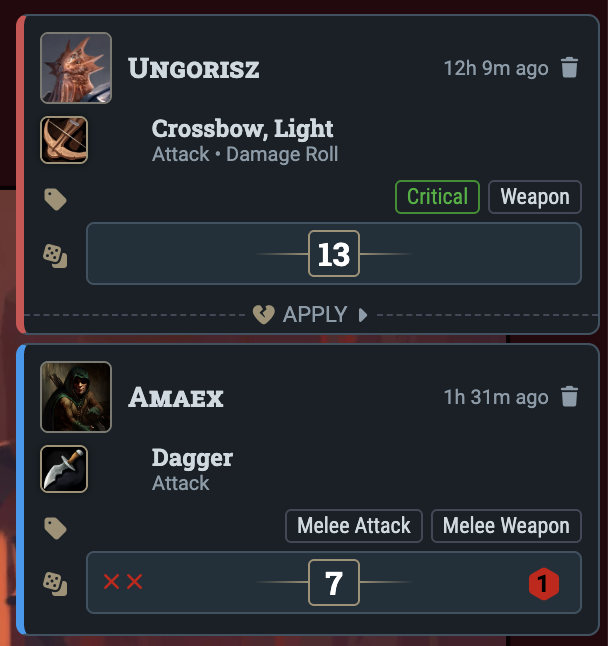
When someone rolls on D&D Beyond in your connected campaign, the roll appears as a card in Foundry chat.
What you get
| What | Tier |
|---|---|
| Rolls from the D&D Beyond website in Foundry chat | Free |
| Pending (“rolling…”) cards, roll result breakdown | Free |
| D&D Beyond roll targets respected (to DM / self stay private) | Free |
| Clicking a card selects and pans to the token | Free |
| Clicking a card opens the sheet or D&D Beyond | Basic |
| Item and spell links on cards | PRO |
| Monster rolls | PRO |
| Rolls from the D&D Beyond mobile app | PRO |
| Rolls made with the Avrae Discord bot (experimental, off by default) | PRO |
Pending cards and results
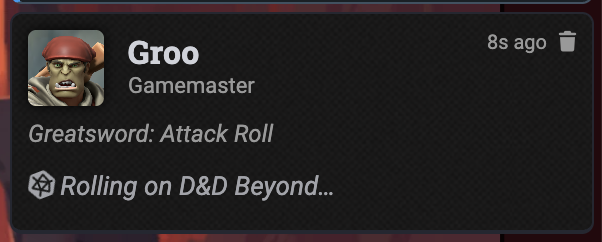
While a roll is still being made, Foundry shows a pending (“rolling…”) card. When the roll is done, the card shows the result and the breakdown of the dice. (Free)
Who sees a roll
D&D Beyond lets a roll go to everyone, to the DM only, or to the roller only. Gamelog respects that: rolls sent “to DM” or “to self” stay private in Foundry too. (Free)
The Rolls & cards page of Gamelog Config has a Who sees rolls section:
| Setting | What it does | Default |
|---|---|---|
| Public character rolls | Who sees character rolls that were rolled publicly on D&D Beyond | Everyone |
| Public monster rolls | Who sees monster rolls that were rolled publicly on D&D Beyond | GM only |
| Respect D&D Beyond roll targets | Rolls sent to the DM or to self stay with the GMs and the player who rolled. When off, they follow the two settings above | On |
| Hide private D&D Beyond rolls | Players who may not see a private roll do not even get Foundry’s “privately rolled some dice” placeholder | On |
| Show rolls in progress | Public rolls show a “rolling…” card until the result arrives. Private rolls never get one | On |
Click actions
Clicking the avatar or the name on a card selects the token and pans the canvas to it. That is free. With Basic, a GM can choose what the click does instead: open the actor sheet, open the character on D&D Beyond, or nothing. The setting is Clicking the roller (GM) on the Rolls & cards page.
The choice applies to GMs only; for players the click always selects and pans to the token.
Upgrade hints
The General page of Gamelog Config has Show upgrade hints in its Interface section. It adds a muted line to a relayed card where a higher Gamelog membership would do something more, for example applying damage.
Only GMs ever see these lines, never players, and the setting is remembered per browser rather than per world. Turn it off once the hints become noise.
Item and spell links
Cards link to the item or spell that was used. (PRO)
Monster rolls
Rolls made for monsters in D&D Beyond also show up. (PRO)
Rolls from the D&D Beyond mobile app
Rolls made on the D&D Beyond website are free. Rolls made in the D&D Beyond mobile app (the one on your phone or tablet, including its dice roller) need PRO. Without PRO they simply do not arrive in Foundry.
Rolls made with Avrae (experimental)
If your table rolls with the Avrae Discord bot, and the character is linked to D&D Beyond, D&D Beyond shows those rolls in its game log. Gamelog can relay them too, so !check persuasion, !save con or !roll 1d20+5 appear as cards in Foundry chat. (PRO, experimental)
It is off by default. Turn on Show Avrae rolls in Gamelog Config → Rolls & cards → Avrae.
Known limits:
!multirolldoes not reach D&D Beyond’s game log, so Gamelog never sees it.- A death save rolled with Avrae does not update the death saves on the D&D Beyond character, so Foundry’s death saves are not updated either. Roll death saves on D&D Beyond to have them synced.
- Avrae rolls are not part of the roll history import.
Good to know
- Only one GM browser relays rolls at a time. See Only one GM relays.
- Rolls land on the right actor only when characters are linked, see Character linking.